
TheOSIRIS JSON Producers
Extract once. Organize consistently. Reuse anywhere.
OSIRIS JSON Producers extract the infrastructure data you already own from hyperscalers, cloud and hosting providers, physical networks, virtualization platforms, on-premises IT, and supported OT environments.
They preserve resource metadata, provider provenance, relationships, and topology context, organizing everything according to the open OSIRIS JSON specification.
The result is a structured, vendor-neutral, point-in-time snapshot that can be stored locally, moved between tools, and reused without depending on a proprietary platform.
Use the same snapshot for documentation, topology diagrams, audits, configuration-drift analysis, CMDB/IPAM/DCIM workflows, or as governed context for AI reasoning and MCP-based solutions.
Your downstream tools do not need direct access or credentials to the live environment. You decide where the snapshot is stored, what information it contains, who can use it, and what it becomes.

Apoint of convergence.
The data already exists.
Your infrastructure data is already present across physical network devices, hypervisors, cloud platforms, hosting providers, and hyperscaler accounts. It may be fragmented across vendors and environments, but it already belongs to you. The challenge is to extract it, preserve its context, and organize it into a consistent structure.
Open and under your control.
OSIRIS JSON is not a closed, proprietary platform. Open-source Producers collect infrastructure data and organize it according to the open, vendor-neutral OSIRIS JSON specification. They run within your environment and generate local JSON documents, so you decide where the data is stored, how it is processed, and who can use it.
Portable, point-in-time snapshots.
Generate structured snapshots of your infrastructure for documentation, topology diagrams, audits, configuration-drift analysis, and CMDB/IPAM/DCIM workflows. The same data can also provide governed, context-optimized input for AI reasoning and MCP-based solutions without granting them direct access to your live infrastructure.
Hybrid AWS and on-premise infrastructure
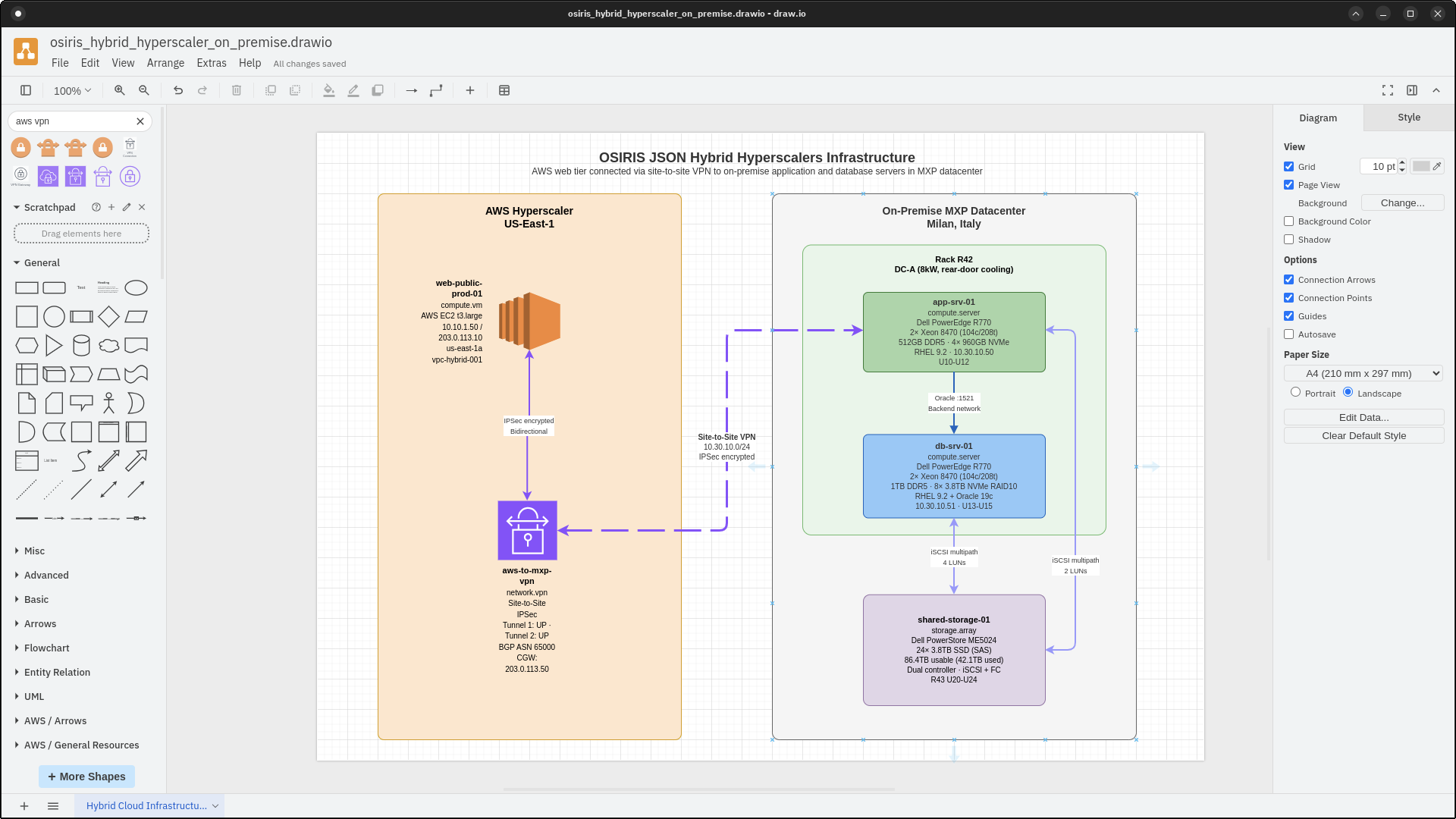
In this OSIRIS JSON example document document we see an AWS Web tier in AWS us-east-1 region connected via VPN to application and database servers in an on-premise datacenter
/examples/v1.0/IT/hybrid/osiris_hybrid_hyperscaler_on_premise.json
{
  "$schema": "https://osirisjson.org/schema/v1.0/osiris.schema.json",
  "version": "1.0.0",
  "metadata": {
    "timestamp": "2026-01-08T16:20:05Z",
    "generator": {
      "name": "manual",
      "version": "1.0.0"
    },
    "scope": {
      "name": "Hybrid cloud infrastructure",
      "description": "Web tier in AWS connected via VPN to application and database servers in MXP datacenter",
      "providers": [
        "aws",
        "custom"
      ],
      "regions": [
        "us-east-1"
      ],
      "accounts": [
        "123456789012"
      ],
      "sites": [
        "mxp-dc-01"
      ],
      "environments": [
        "production"
      ]
    }
  },
  "topology": {
    "resources": [
      {
        "id": "aws::i-0web456def789",
        "type": "compute.vm",
        "name": "web-public-prod-01",
        "description": "Public facing web server in AWS",
        "provider": {
          "name": "aws",
          "type": "AWS::EC2::Instance",
          "native_id": "i-0web456def789",
          "region": "us-east-1",
          "account": "123456789012",
          "zone": "us-east-1a"
        },
        "status": "active",
        "state": "running",
        "properties": {
          "instance_type": "t3.large",
          "platform": "linux",
          "private_ip": "10.10.1.50",
          "public_ip": "203.0.113.10",
          "vpc_id": "vpc-hybrid-001"
        },
        "tags": {
          "Environment": "production",
          "Location": "cloud",
          "Tier": "web"
        }
      },
      {
        "id": "mxp::srv-r770-001",
        "type": "compute.server",
        "name": "app-srv-01",
        "description": "Dell PowerEdge R770 application server",
        "provider": {
          "name": "custom",
          "namespace": "osiris.com.acme",
          "native_id": "srv-r770-001",
          "site": "mxp-dc-01",
          "system": "datacenter-inventory"
        },
        "status": "active",
        "state": "operational",
        "properties": {
          "manufacturer": "Dell",
          "model": "PowerEdge R770",
          "serial_number": "SRV770001",
          "location": {
            "datacenter": "MXP",
            "room": "DC-A",
            "rack": "R42",
            "rack_unit": "U10-U12"
          },
          "hardware": {
            "cpu": {
              "model": "Intel Xeon Platinum 8470",
              "cores": 52,
              "threads": 104,
              "sockets": 2
            },
            "memory": {
              "total_gb": 512,
              "type": "DDR5",
              "speed_mhz": 4800
            },
            "storage": [
              {
                "type": "NVMe",
                "capacity_gb": 960,
                "interface": "PCIe Gen4",
                "quantity": 4
              }
            ]
          },
          "network_interfaces": [
            {
              "name": "eth0",
              "mac": "02:AA:BB:CC:DD:01",
              "ip_address": "10.30.10.50",
              "speed_gbps": 10
            }
          ],
          "operating_system": "Red Hat Enterprise Linux 9.2",
          "hypervisor": "none"
        },
        "tags": {
          "Environment": "production",
          "Location": "on-premise",
          "Datacenter": "MXP",
          "AssetTag": "ACME-R770-001"
        }
      },
      {
        "id": "mxp::srv-r770-002",
        "type": "compute.server",
        "name": "db-srv-01",
        "description": "Dell PowerEdge R770 database server",
        "provider": {
          "name": "custom",
          "namespace": "osiris.com.acme",
          "native_id": "srv-r770-002",
          "site": "mxp-dc-01",
          "system": "datacenter-inventory"
        },
        "status": "active",
        "state": "operational",
        "properties": {
          "manufacturer": "Dell",
          "model": "PowerEdge R770",
          "serial_number": "SRV770002",
          "location": {
            "datacenter": "MXP",
            "room": "DC-A",
            "rack": "R42",
            "rack_unit": "U13-U15"
          },
          "hardware": {
            "cpu": {
              "model": "Intel Xeon Platinum 8470",
              "cores": 52,
              "threads": 104,
              "sockets": 2
            },
            "memory": {
              "total_gb": 1024,
              "type": "DDR5",
              "speed_mhz": 4800
            },
            "storage": [
              {
                "type": "NVMe",
                "capacity_gb": 3840,
                "interface": "PCIe Gen4",
                "quantity": 8,
                "raid": "RAID 10"
              }
            ]
          },
          "network_interfaces": [
            {
              "name": "eth0",
              "mac": "02:AA:BB:CC:DD:01",
              "ip_address": "10.30.10.51",
              "speed_gbps": 10
            }
          ],
          "operating_system": "Red Hat Enterprise Linux 9.2",
          "database": "Oracle Database 19c"
        },
        "tags": {
          "Environment": "production",
          "Location": "on-premise",
          "Datacenter": "MXP",
          "Purpose": "database",
          "AssetTag": "ACME-R770-002"
        }
      },
      {
        "id": "mxp::storage-dell-me5024",
        "type": "storage.array",
        "name": "shared-storage-01",
        "description": "Dell PowerStore ME5024 storage array",
        "provider": {
          "name": "custom",
          "namespace": "osiris.com.acme",
          "native_id": "storage-me5024-001",
          "site": "mxp-dc-01",
          "system": "datacenter-inventory"
        },
        "status": "active",
        "state": "operational",
        "properties": {
          "manufacturer": "Dell",
          "model": "PowerStore ME5024",
          "serial_number": "ME5024001",
          "location": {
            "datacenter": "MXP",
            "room": "DC-A",
            "rack": "R43",
            "rack_unit": "U20-U24"
          },
          "capacity": {
            "raw_tb": 115.2,
            "usable_tb": 86.4,
            "used_tb": 42.1
          },
          "drives": {
            "type": "SSD",
            "capacity_gb": 3840,
            "quantity": 24,
            "interface": "SAS"
          },
          "protocols": [
            "iSCSI",
            "FC"
          ],
          "controllers": 2,
          "redundancy": "dual-controller"
        },
        "tags": {
          "Environment": "production",
          "Location": "on-premise",
          "Datacenter": "MXP",
          "AssetTag": "ACME-STR-001"
        }
      },
      {
        "id": "aws::vpn-connection-001",
        "type": "network.vpn",
        "name": "aws-to-mxp-vpn",
        "description": "Site-to-site VPN connecting AWS to MXP datacenter",
        "provider": {
          "name": "aws",
          "type": "AWS::EC2::VPNConnection",
          "native_id": "vpn-0abc123456def",
          "region": "us-east-1",
          "account": "123456789012"
        },
        "status": "active",
        "state": "available",
        "properties": {
          "type": "ipsec.1",
          "vpn_gateway_id": "vgw-0123456",
          "customer_gateway_ip": "203.0.113.50",
          "tunnel_1_status": "UP",
          "tunnel_2_status": "UP",
          "bgp_asn": 65000
        },
        "tags": {
          "Environment": "production",
          "Purpose": "hybrid-connectivity"
        }
      }
    ],
    "connections": [
      {
        "id": "conn-web-to-vpn",
        "type": "route",
        "source": "aws::i-0web456def789",
        "target": "aws::vpn-connection-001",
        "direction": "bidirectional",
        "name": "Web server to VPN",
        "description": "Traffic from AWS web server through VPN to on-premise",
        "properties": {
          "protocol": "ipsec",
          "encrypted": true
        }
      },
      {
        "id": "conn-vpn-to-app",
        "type": "route",
        "source": "aws::vpn-connection-001",
        "target": "mxp::srv-r770-001",
        "direction": "bidirectional",
        "name": "VPN to application server",
        "description": "Hybrid connectivity to on-premise application",
        "properties": {
          "network": "10.30.10.0/24",
          "mtu": 1500
        }
      },
      {
        "id": "conn-app-to-db",
        "type": "dependency",
        "source": "mxp::srv-r770-001",
        "target": "mxp::srv-r770-002",
        "direction": "forward",
        "name": "Application to database",
        "description": "Direct connection between on-premise servers",
        "properties": {
          "protocol": "oracle",
          "port": 1521,
          "network": "backend"
        }
      },
      {
        "id": "conn-db-to-storage",
        "type": "dependency",
        "source": "mxp::srv-r770-002",
        "target": "mxp::storage-dell-me5024",
        "direction": "bidirectional",
        "name": "Database to storage",
        "description": "Database server storage connectivity",
        "properties": {
          "protocol": "iscsi",
          "lun_count": 4,
          "multipath": "enabled"
        }
      },
      {
        "id": "conn-app-to-storage",
        "type": "dependency",
        "source": "mxp::srv-r770-001",
        "target": "mxp::storage-dell-me5024",
        "direction": "bidirectional",
        "name": "Application to storage",
        "description": "Application server shared storage",
        "properties": {
          "protocol": "iscsi",
          "lun_count": 2,
          "multipath": "enabled"
        }
      }
    ],
    "groups": [
      {
        "id": "group-aws-cloud",
        "type": "logical.environment",
        "name": "AWS Cloud Resources",
        "description": "All resources in AWS cloud",
        "members": [
          "aws::i-0web456def789",
          "aws::vpn-connection-001"
        ],
        "tags": {
          "Location": "cloud",
          "Provider": "aws"
        }
      },
      {
        "id": "group-mxp-datacenter",
        "type": "physical.site",
        "name": "MXP Datacenter",
        "description": "All on-premise resources in Milan Datacenter",
        "members": [
          "mxp::srv-r770-001",
          "mxp::srv-r770-002",
          "mxp::storage-dell-me5024"
        ],
        "properties": {
          "address": "Via Malpensa 1, 21010 Vizzola Ticino VA, Italy",
          "coordinates": "45.6301° N, 8.7280° E"
        },
        "tags": {
          "Location": "on-premise",
          "Datacenter": "MXP"
        }
      },
      {
        "id": "group-rack-r42",
        "type": "physical.rack",
        "name": "Rack R42",
        "description": "Compute servers in rack R42",
        "members": [
          "mxp::srv-r770-001",
          "mxp::srv-r770-002"
        ],
        "properties": {
          "rack_units": 42,
          "power_capacity_watts": 8000,
          "cooling": "rear-door"
        },
        "tags": {
          "Room": "DC-A",
          "Row": "4",
          "Position": "2"
        }
      }
    ]
  }
}
Open Source, End-to-End.
If you generate your infrastructure data into an open, portable format like JSON, you should expect the resulting topology and documentation to be equally delivered in an open and accessible format.
Arriving before the end of 2026, OSIRIS JSON Consumers will bridge this gap. These lightweight program will be installed on-premise and natively ingest your OSIRIS JSON documents to automatically generate visual topologies with draw.io and infrastructure documentation natively in Markdown format.
Get notified when available
Leave your details and we'll email you as soon as OSIRIS JSON Consumers are ready.